Microsoft Security Essentials
- Downloads Count: 88,324
- License Type: Free
- Price: Free
- Date Added: 2010
- Operating Systems: Windows XP, Windows Vista, Windows Server 2003, Windows 7
- Requirements: 32- or 64-bit OS; CPU w/clock speed of 500MHz (1GHz for Vista/7); 256MB RAM (1GB for Vista/7); 140MB free hard disk space; IE 6.0 or Firefox 2.0
- Author: Microsoft
Editorial Review of Microsoft Security Essentials
Note: This review addresses the first version of the product.Standalone antivirus product Microsoft Security Essentials has caused a stir, as might be expected when the words "Microsoft" and "free" are involved. In a post on the day of its launch, I referenced AV-Test performance results from a MSE beta. We now have new results from tests conducted against the final product, and overall MSE looks good:Malware detection: MSE detected 98.44 percent of AV-Tests's collected zoo of 545,034 viruses, worms, backdoors, bots and Trojans, an entirely respectable showing. However, it didn't do nearly as well when it came to detecting adware and spyware, such as bank info stealers, and detected only 90.95 percent of the 14,222 samples.As expected, MSE detected 100 percent of the samples in the Wildlist. Most reputable AV apps detect all the Wildlist samples.Dynamic/behavioral detection: If a program includes behavioral detection, it can identify malware based solely on how it acts on a PC. It's a useful feature for detecting brand-new malware that doesn't yet have a signature.AV-Test found that MSE doesn't include any effective behavioral detection. However, AV-Test's Andreas Marx noted that's typically the case for standalone antivirus programs, and that you'll generally need to buy a security suite to get the feature.Or, you can pair your free or paid standalone AV program with PC Tools' free Threatfire, which adds an impressive layer of behavioral detection to your security arsenal.Disinfection: MSE was able to clean up all of the active components from 25 different test infections, meaning the malware was effectively neutered. As is usually the case, the program often left behind some traces of the infection, such as registry entries or a turned-off Windows firewall.Rootkit removal: MSE did well here. It identified and removed all 25 rootkits (stealth technology used to hide other malware) used in the tests.Scan speed: When I compared the MSE beta to other free (and finished) AV apps over the summer, it came in last for scanning speed. In these latest tests, Marx says that MSE scan speed "is quite OK when compared with other AV products" - not the fastest, but not the slowest.False alarms: Security Essentials didn't put up any false positives for any of 600,000 known clean files used by Windows, Office and other common apps. However, as Marx notes, most of those files come from Microsoft, so a false positive would have been surprising.Overall, these results show that Security Essentials holds its own as a free standalone antivirus app. As with most other options in that category, it doesn't provide a firewall, behavioral detection, or other security extras. But since Vista and Windows 7 already include a two-way firewall, and you can add top-notch behavioral protection with another free app, MSE looks like a good budget choice for baseline antivirus protection.
Tuesday, March 29, 2011
Microsoft Security Essentials


avast! Free Antivirus
avast! Free Antivirus

- Version: 5.1.889
- Downloads Count: 793,033
- License Type: Free
- Price: Free
- Date Added: March, 2011
- Operating Systems: Windows 2000, Windows XP, Windows Vista, Windows 7
- Requirements: 32-bit or 64-bit OS, Pentium 3 processor, 128MB RAM, 100MB free hard drive space
- File Size: 57455 KB
- Author: AVAST Software

Editorial Review of avast! Free Antivirus
Avast Free Antivirus 5 took the top spot in our late 2010 roundup of free antivirus software. It provides good, all-around malware detection in a speedy, well-designed package. We liked its easy installation process, smooth interface design, and minimal impact in system performance. However, although it wins out overall, its malware detection, while good, isn't the best we've seen.
Avast Free Antivirus 5 is well designed and generally easy to use. In most respects, it's a somewhat scaled-down version of the paid Avast Pro Antivirus 5. The installation process was quick and painless, and I had to click through only a couple of screens before it started installing. The main screen is laid out nicely and is easy to use, though not without its flaws. A slightly annoying aspect of Avast Free Antivirus the fact that a banner advertising its paid counterpart will appear on the Summary tab, but since it's unobtrusive, it isn't a serious issue.
First, the negatives: In traditional malware scanner tests (which rely predominantly on signature files to identify malware), Avast Free Antivirus detected 94.8 percent of samples, which is neither particularly good nor bad (top scorers detected over 99 percent of malware samples). It also did a decent, though not outstanding, job at detecting malware in our real-world malware detection tests: It completely blocked 76 percent of attacks (which is right about average), and partially blocked 4 percent of attacks. The top performer in this test, the free Comodo Internet Security Premium, completely blocked 96 percent of attacks.
But on the plus side, Avast Free Antivirus didn't falsely identify a single "safe" file as a piece of malware, the only free product we looked at that did so. Avast Free also did a good job at disinfecting a PC, detecting all infections on our test PC and removing all active components of malware infections 80 percent of the time, which set the pace among the free products we reviewed.
Scan speeds are very good, too. It scanned 4.5GB of data in 90 seconds in the on-demand scan test (that is, scans started by pressing the Scan Now button). This was a close second to Avira AntiVir Personal, which completed the test in 87 seconds. And Avast Free completed the on-access scan speed test in 3 minutes, 40 seconds--tops among the products we looked at. This is a good test to tell how well security software can scan for malware when files are opened or saved to disk.
Avast Free Antivirus also had a low impact on PC performance. Our test PC with Avast Free installed booted up in 44.5 seconds, which is roughly 4.5 seconds slower than the PC without antivirus software installed, but less of a slowdown than the average of the free antivirus software we looked at. The same held true for many of the other speed tests we performed.
Avast's support options outclass other free antivirus programs. Unlike most free antivirus software which only comes with online support, Avast offers free telephone support, so you'll actually be able to talk with someone directly if you have a problem. For some, that alone may be worth the tradeoff of good-but-not-top-notch malware detection. Although it wasn't the top performer in every category, Avast Free Antivirus is an excellent, well-rounded free antivirus program.
Hal9000 Windows 7 Theme

Turn your Windows 7 desktop into Hal 9000 from Stanley Kubrick's landmark science-fiction movie2001: A Space Odyssey with this terrific theme pack, contributed to Windows 7 Themes.net by dw-wizard. Released in 1968, the collaboration between Kubrick and Arthur C. Clarke initially received mixed reviews--but the movie and its sentient computer now have a permanent place in American culture. Hal, in particular, has a special place in the subconscious of many people who, like me, watched the movie at an impressionable age.Load up Hal9000 and you get wallpaper that recalls the fictional computer's interface plus appropriate icons, cursors, and sounds. I particularly like the sound effects, which include clips from the movie (empty the Recycle Bin, for example, and Hal says "I feel much better now, I really do").If you enjoy classic science fiction, this theme pack is definitely worth the download. (And if you like Hal9000, you might also want to check out our Blade Runner Windows 7 theme.)Note: To install the Windows 7 theme, just unzip the archive file and double-click the themepack within. Windows does the rest.
Hal9000 Windows 7 Theme
- Downloads Count: 411
- License Type: Free
- Price: Free
- Date Added: Mar 24, 2011
- Operating Systems: Windows 7
- File Size: 2152 KB
- Author: Windows 7 Themes.net

Four Reasons To Avoid the BlackBerry PlayBook
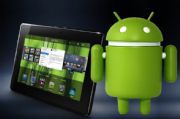
The BlackBerry PlayBook will soon move from vaporware to the real world. The seven-inch tablet will be available April 19 in 16GB, 32GB, and 64GB models that match the price ofequivalent Apple iPad 2 models at $500, $600, and $700. The parity of storage capacity and price makes for a somewhat level playing field in comparing the two, so here are a few reasons that stand out to steer clear of the BlackBerry PlayBook.
Size- While the two tablets may seem evenly matched you're paying the same amount for a smaller device with the PlayBook. It's like going to a restaurant and having them tell you that the medium drink, and the large drink are both the same price--wouldn't you get the large drink? There are those, however, who consider the seven inch tablet to be a virtue--lighter and easier to work with one-handed. I'm just not one of them. I don't agree that those factors are worth sacrificing display size.
The jury is still out and there is plenty of passionate debate over whether the tablet can fill the role of mobile computingplatform in place of a notebook PC. With a tablet like the iPad 2 or Xoom, there is at least enough screen real estate totake on some productivity tasks, but a tablet like the BlackBerry PlayBook is more like an oversized smartphone than a slim notebook and is too small to accomplish much more than you can with many smartphones.
3G Wireless- The BlackBerry tethering feature is sort of cool--being able to sync email and use the PlayBook as a larger external display for a BlackBerry smartphone (although not much larger as we just got done talking about). However, with the PlayBook, tethering with a BlackBerry smartphone isn't just a feature, it's a necessity. The initial PlayBook models will only be equipped with Wi-Fi, and will be unable to sync data with a BlackBerry Enterprise Server at all. Tablets like the iPad 2 and Xoom also come in 3G models with cellular networking to connect in areas where no wireless network is available.
Email- The PlayBook doesn't do email. Using BlackBerry Bridge to tether the PlayBook with a BlackBerry smartphone will allow some email functionality by enabling the smartphone connection with BES to pass through to the tablet. As for email outside of BES, RIM suggests using the Web to get to it--like logging into Outlook Web Access. An update is planned for later this year which will supposedly give the PlayBook the ability to connect to BES natively, and possible expand other email options, but for a tablet aimed primarily at business users this wonky email setup is a severe handicap.
Apps- RIM won some bonus points with the announcement that the BlackBerry PlayBook will be able to run Android apps. Kudos. However, Android as a platform has only fraction of the apps available for Apple's iOS. If you break it down based on apps that are actually designed for the tablet as opposed to the smartphone, the gap is even wider in favor of the iPad. I know that the majority of app pitches I get are aimed at the iPad, and when I inquire about other platforms Android is on the radar, but has to wait a few months because it's a lower priority.
The Android apps won't run natively either, which could lead to performance issues. The Android apps will run in an a separate environment within an app player which can be downloaded from BlackBerry App World. The PlayBook will also run BlackBerry apps, but there are even fewer of those.
In many ways, the PlayBook seems more on par with the Atrix 4G laptop dock than with other tablets. It has more functionality than the Atrix 4G as a standalone mobile device, but when it comes to critical functionality the RIM tablet relies heavily on the BlackBerry smartphone.
If you have a BlackBerry smartphone, there are some cool features in the PlayBook and you should at least check it out--but, I believe that other tablets still present a much better value. If you don't have a BlackBerry smartphone, don't even think about getting a PlayBook tablet.
How an iOS 5 Delay Could Muck up the iPhone 5 Launch
Rumor has it that Apple will delay iOS 5, the upcoming version of its iPhone operating system, until the fall, but that would make the iPhone 5 a tough sell if it still launches this summer.
Here's how the iPhone and iOS launches worked last year: Apple announced major changes to iOS in April, including multitasking, app folders, and a unified inbox. Then in June, Apple announced the iPhone 4 at the Worldwide Developers Conference. Both the iPhone 4 and iOS 4 arrived later that month.
This year, Apple may push iOS 5 back to the fall, two anonymous sources told TechCrunch. But if the iPhone isn't delayed along with iOS, Apple might not have much to talk about when it launches the iPhone 5.
Sure, you can expect some hardware improvements. The rumor mill is guessing at a bigger screen, thesame A5 dual-core processor found in the iPad 2 and possibly near-field communication for making payments from the phone (or perhaps not). But as Apple itself has argued, speeds and feeds aren't that important anymore. These days, it's all about the user experience, and new iPhones are as much about the software as they are about the hardware.
Take a look at the current feature page for the iPhone 4. One of the most prominently advertised features is multitasking, which is part of iOS 4 and not tied to the iPhone 4 specifically. Software was an even bigger emphasis for the iPhone 3GS, whose old product page mentioned voice control, a compass, copy and paste and a landscape keyboard as major selling points.
That's why I'm skeptical of TechCrunch's claim that Apple will launch the next iPhone with iOS 4.x, saving a more substantial software upgrade for the fall. Without a new OS, the iPhone 5 will lack new features for Apple to advertise, and it's just not Apple's style to release a product with an IOU for unreleased benefits.
Some earlier reports suggest that Apple will hold off on the iPhone 5 until the fall, which to me seems likely if iOS 5 will be delayed as well. There are also rumors of a cheaper, possibly smaller iPhone that would launch separately from the iPhone 5. Maybe that's what we'll see in the summer. At this point, it's anybody's guess, but one thing's certain: If Apple launches the iPhone 5 without a software update to match, it'll be a big letdown.

Monday, March 28, 2011
Budget Advisor
Budget Advisor provides a simple to manage your money. Not feeling in control of your finances can be scary. Budget Advisor puts you back in the driving seat by allowing you to easily see where your money is going each month. Once you know what is happening with your money you can find way to pay off your debt and start saving.Budget Advisor will let you import your statements, saving you time. Powerful reporting will let you see exactly what is happening with your money.Budget Advisor works in any currency.
Read more: Budget Advisor - Free software downloads and software reviews - CNET Download.com http://download.cnet.com/Budget-Advisor/3000-2057_4-10054291.html?tag=rb_content;main#ixzz1HwF6V4Ea
Subscribe to:
Comments (Atom)